
Run your entire development in one system.
The way projects are managed today
Your project is one system. Your tools usually aren't.
A typical development is spread across spreadsheets, email, messaging apps, shared folders, documents and separate sales tools. Each tool may work on its own, but the project becomes difficult to see as a whole.
Information everywhere
Documents, decisions, contracts and project information live in different places.
No single project view
The team can see individual pieces of the project, but getting the complete picture often means collecting information manually.
Work gets repeated
The same project, unit, buyer or financial information is entered and maintained in multiple places.
Phasivo brings the operational side of the development back into one project context.
One project. Connected operations.
Everything important about the project stays connected.
- 01Planning & permits
- 02Construction
- 03Budget & cash flow
- 04Units
- 05Sales
- 06Contracts & payments
- 07Handover
- 08After-sales
From first decision to final handover
One project. One continuous history.
Phasivo follows the project through its lifecycle instead of treating every stage as a separate system.
- Phase 00
Feasibility
Capture the initial project context, decisions and preparation.
- Phase 01
Land Acquisition
Keep land-related information and documentation connected to the project.
- Phase 02
Permits
Track documents, processes, deadlines and key decisions.
- Phase 03
Construction
Manage phases, tasks, risks, changes, contractors, documents, situations, budget and expenses.
- Phase 04
Sales
Track units, leads, reservations, contracts, payments and sales status.
- Phase 05
After-Sales
Keep handover, cadastral registration, defects, warranties and post-handover obligations connected to the project.
Built around the way developers actually work
The project in one place.
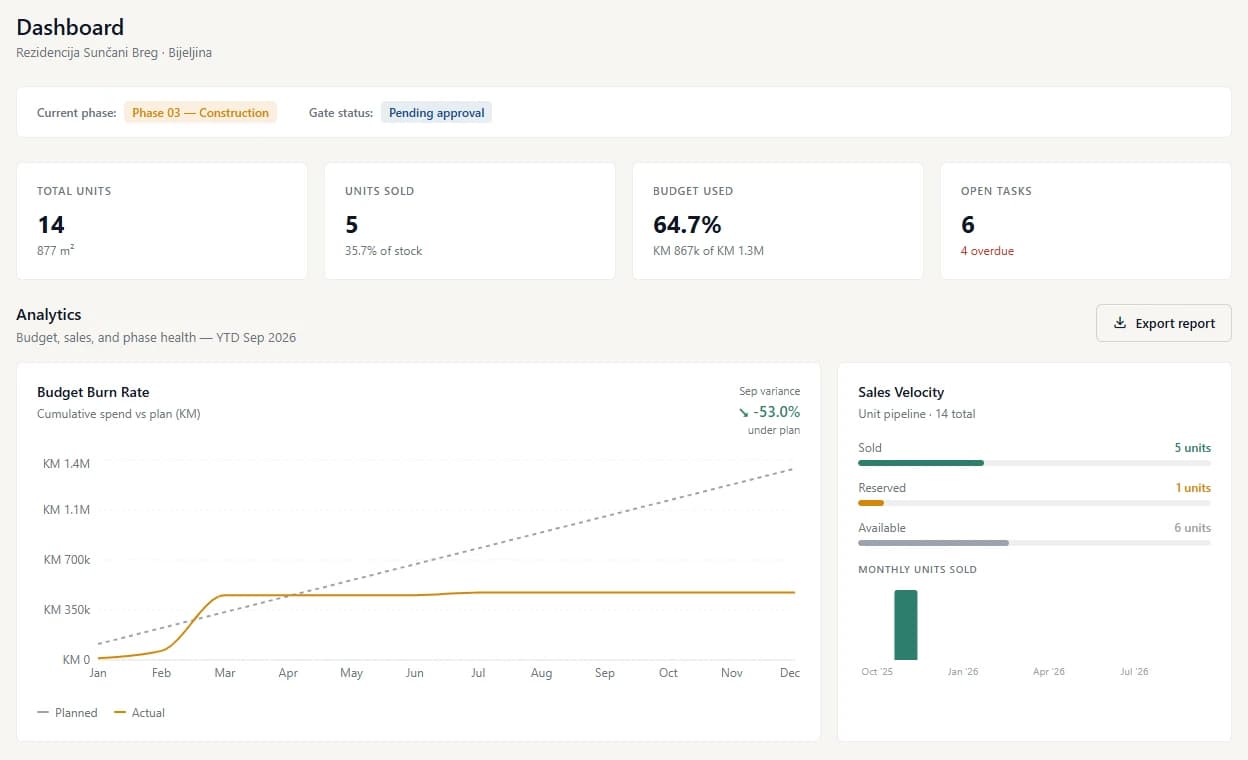
Know where the project stands.
Phases, gates, tasks, risks, decisions, changes and documents give the team a shared operational view.
Keep construction connected to the project.
Contractors, work contracts, situations, progress, documents and construction information stay inside the same project.
Know where the money is going.
Budget, expenses, cash flow and PDV provide a financial view alongside the operational project data.
Connect every unit to its sales status.
Track units, leads, reservations, contracts and payments without maintaining separate project and sales records.
Keep the project useful after construction.
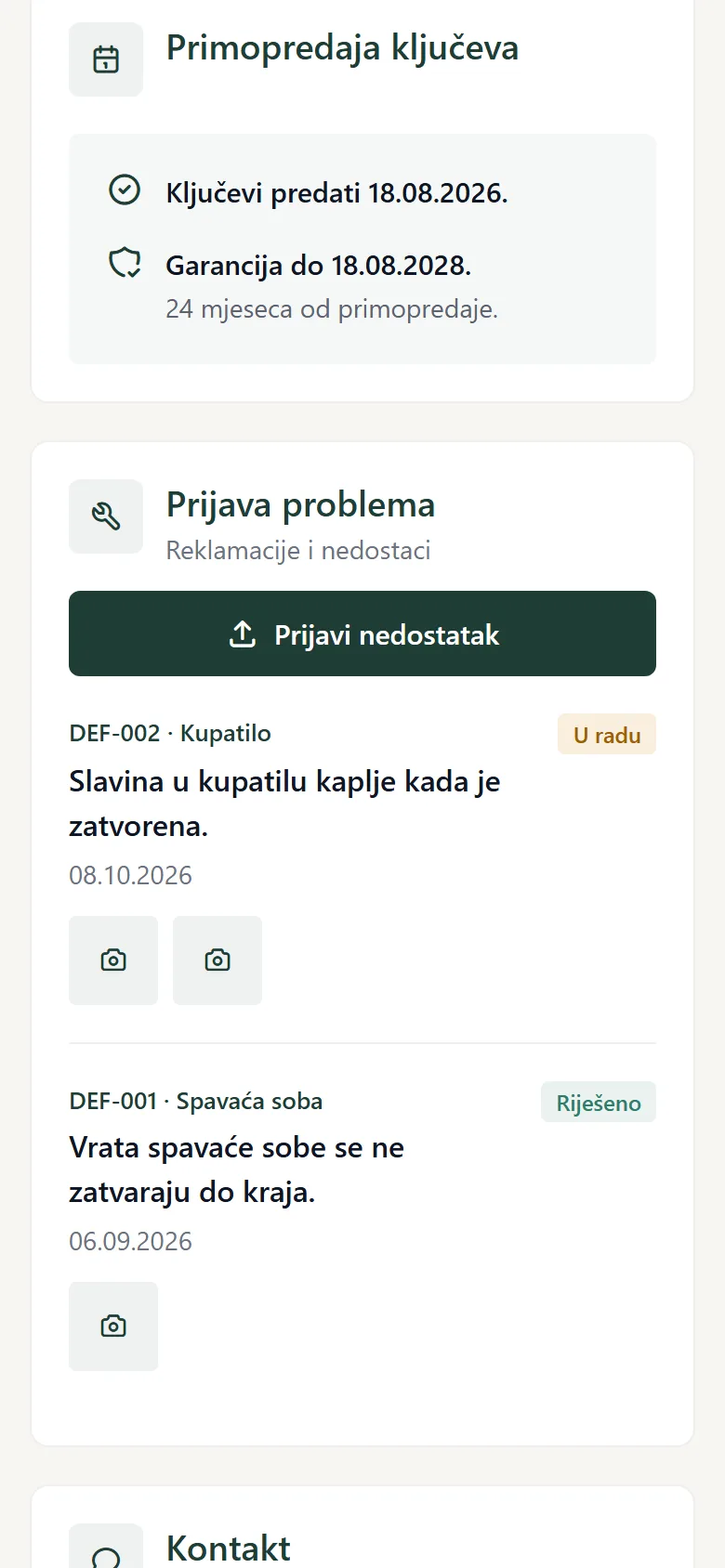
Buyers book the key handover and report defects on their own page; the warranty, cadastral registration and post-handover records stay part of the project history.
Also included
The project's own website
Each project can have a public page under the developer’s own brand and domain — units with live availability, floor plans and photos, gallery, location, an enquiry form and an apartment configurator — fed by the same project data. Every enquiry and every saved configuration lands in Leads.
The unit is more than a row in a spreadsheet
Follow every unit through the project.
- Available
- Lead
- Reserved
- Contracted
- Payments
- Handover
- After-sales
For buyers
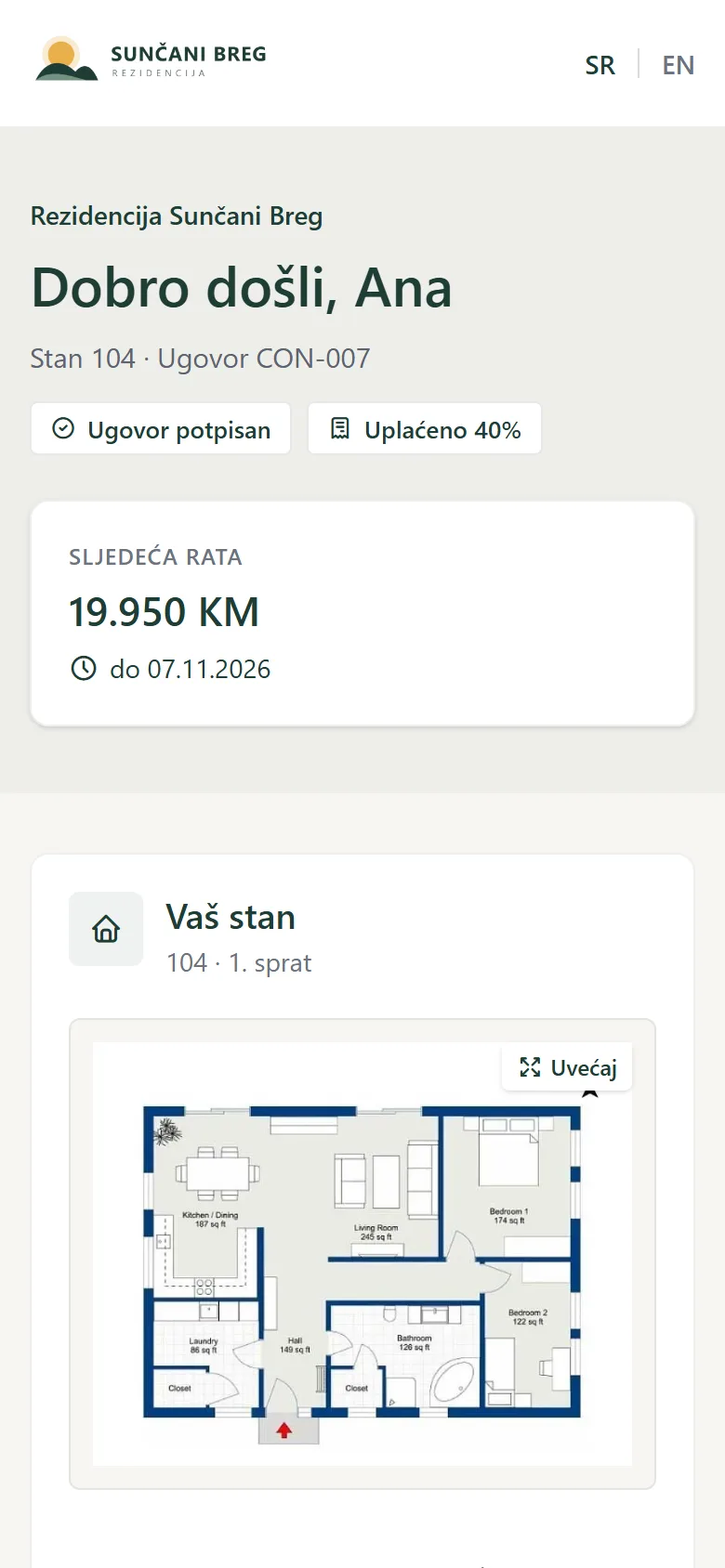
Every buyer gets their own page.
After signing, the buyer gets a link to their apartment’s own page, in the developer’s brand. On their phone they see everything they would otherwise call the office about — no account, no password.
- Payments and the next instalment, with a receipt for each one paid
- The signed contract, ready to download
- The finishes they chose, and what they cost
- The key handover — they pick the time themselves
- Problems after moving in, reported with a photo
- The warranty, and when it ends
- Photos of their apartment being built
Less retyping
What repeats, Phasivo does for you.
Phasivo reads your invoices
…and contractors’ progress bills
Contracts from your own Word template
Leads arrive by themselves
Confirmations and reminders
Everyone gets their own notices
Not another project management tool
Built for developers, not just construction teams.
Construction software usually focuses on what happens on the job site. Sales software focuses on buyers. Financial software focuses on money. Document systems focus on files. Phasivo is designed around the development itself and connects these operational areas around one project.
Project-first
The project is the central object, not an individual task, document or user.
Developer-focused
Phasivo is designed around the decisions and information a developer needs to manage the whole development.
Regional by design
The product is built with the workflows, terminology and operating reality of Southeast European residential development in mind.
Built for the right size of developer
Too much for Excel. Too small for enterprise software.
Phasivo is designed primarily for private residential and mixed-use developers managing projects that have become too complex for spreadsheets and disconnected tools, but don't need the cost and complexity of a large enterprise construction platform.
Residential developers
Projects with approximately 20–100 units and active construction and sales.
Mixed-use developers
Residential projects with commercial components and multiple operational stakeholders.
Growing development companies
Teams moving from individual project management toward a repeatable system they can use across multiple projects.
This is who Phasivo is designed around, not a limit on the projects it can run.
From your current workflow to Phasivo
We don't expect you to start from an empty database.
Your project already exists. It has units, budgets, documents, contractors, contracts and other information. Phasivo implementation is designed to bring that information into the platform and configure the project around the way your team works.
- 01
Project assessment
We understand the project, current tools, data and workflow.
- 02
Setup & migration
We configure the project and migrate the agreed initial data.
- 03
Team onboarding
Users, permissions and core workflows are configured and key users are trained.
- 04
Go live
The project moves into Phasivo with an initial support period.
The goal is not to give you another tool to maintain. The goal is to make Phasivo the place where the project is actually managed.
Simple project-based pricing
One project. One licence. No per-user pricing.
Phasivo is licensed by project, not by individual user. Every project includes the full platform. Pricing depends on project size, complexity and implementation requirements.
Full platform
No artificial feature tiers. Your project gets the complete Phasivo platform.
Unlimited project users
Add the people who need to work with the project without turning every additional user into another subscription.
Lifecycle-based
The full licence covers the active project lifecycle. When the project moves into after-sales, it continues on a separate after-sales licence.
Questions developers ask
Frequently asked questions
What type of projects is Phasivo designed for?
Phasivo is primarily designed for residential and mixed-use development projects, especially projects that have become too complex to manage efficiently through spreadsheets, email and messaging apps alone.
Is Phasivo priced per user?
No. Phasivo is licensed per project. The aim is to let the people who need to work on the project use the system without per-seat pricing.
Does every project get the full platform?
Yes. Phasivo does not use artificial feature tiers. Pricing depends on project scale, complexity and implementation requirements.
How long does a project stay on Phasivo?
The active licence covers the project's active lifecycle. After construction and sales are substantially complete, the project moves onto the after-sales licence.
What happens when the project is finished?
The project remains available for post-handover work such as defects, warranties and project records. When those obligations are complete, the project's records can be exported as agreed in your licence.
Can Phasivo import our existing data?
Yes, agreed initial project data can be migrated as part of implementation. The exact scope depends on the quality, format and volume of the existing data.
Can we use Phasivo for more than one project?
Yes. Each project is licensed separately. Developers with multiple active projects can discuss portfolio arrangements.
Is Phasivo an accounting system?
No. Phasivo provides project-level financial control, including budget, expenses, cash flow and PDV information. It complements rather than replaces your organisation's accounting system.
Is Phasivo only for Southeast Europe?
The product is designed initially for Southeast European development workflows, but the underlying platform is suitable for residential and mixed-use projects more broadly.
Can Phasivo be customised?
Phasivo is configurable within the capabilities of the standard platform. Custom development and integrations can be assessed separately when they make commercial and product sense.
Do buyers need an account?
No. After signing, the buyer gets a link to their own page by e-mail. On a new phone or computer they enter a six-digit code sent to their e-mail — there is no password.
Do contractors have to use Phasivo?
No. A contractor can use their own portal or work by e-mail only; the office then records their progress bills and repairs.
Does Phasivo read invoices by itself?
Yes. Upload supplier invoices, fiscal receipts or a contractor’s progress bill and Phasivo fills in the fields. Nothing is saved until a person checks and confirms it, and automatic reading can be switched off for your organisation.
Which languages and currencies does it support?
Serbian and English — the app, the project page, the buyer’s page and the e-mails. Each project runs in KM or euro, and everything works on a phone as well as a computer.